Overview
The Buy Sell Magic Indicator is a helpful tool for MetaTrader 4 (MT4) platform that makes Forex trading a lot easier. It combines 3 indicators and a custom price action filter to give clear buy and sell signals. This indicator is great for both new and experienced traders because it’s easy to use and doesn’t have any confusing lines or numbers on the chart. The Buy Sell Magic Indicator works best for lower time frames like M1, M5, M15, and M30, particularly during the more volatile London and New York trading sessions.
The Developer’s Vision
The developer’s goal is clear: to create a simple yet powerful tool for all Forex traders by eliminating unnecessary clutter such as bands, histograms, and complex lines. Instead, it uses straightforward visual cues – arrows. The developer aimed to help traders make better decisions by providing clear signals and suggesting stop-loss levels.
How It Works
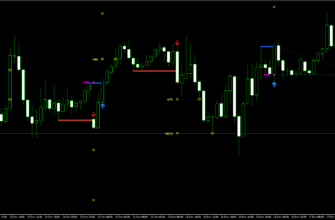
The Buy Sell Magic Indicator works by showing arrows on your trading chart:
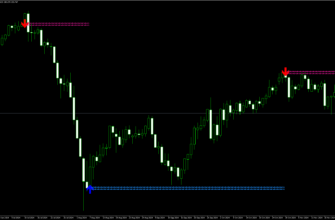
- A green arrow means it’s a good time to buy (go long).
- A red arrow means it’s a good time to sell (go short).
The indicator also shows dotted lines that can help you set your stop-loss. These stop-loss levels can help you to manage risk by setting proper exit points to minimize losses:
- A blue dotted line acts as support for buy trades.
- A red dotted line acts as resistance for sell trades.
When a signal appears, you’ll get an alert on the screen. This alert also suggests where to put your stop-loss.

Key Features
- Green and red arrows for clear buy and sell signals
- Dotted lines to help set stop-loss levels with alerts
- Screen alerts for real-time signal notifications
- Custom price action filter for enhanced accuracy of the signals
- No confusing lines or numbers on the chart
- Works with any available currency pair
- Best for shorter time frames, such as M1, M5, M15, M30
- Most effective during London and New York trading sessions
Key Advantages for Traders
- Easy to use: Just follow the arrows to know when to buy or sell
- Clear signals: No need for complicated analysis
- Risk management: Helps you set stop-loss levels to protect your trades
- Flexible: Works with any currency pair
- Real-time alerts: You won’t miss trading opportunities
- Suitable for everyone: Helpful for both newbies and experienced traders

How to Install Buy Sell Magic Indicator
- Download the Buy Sell Magic Indicator file using this link or the button above.
- Open your MetaTrader 4 application, click File – Open Data Folder.
- Open the “MQL4” folder within the MT4 directory.
- Find the “Indicators” subfolder and open it.
- Copy the downloaded Buy Sell Magic Indicator file into the “Indicators” folder.
- In MT4, navigate to the “Navigator” window on the left side of the interface.
- Right click anywhere inside the “Navigator” window and click “Refresh”
- Expand the “Custom Indicators” section.
- Find the Buy Sell Magic Indicator in the list, then drag and drop it onto your desired chart.
- Adjust the settings in the indicator’s properties window if desired (the default settings are optimized for immediate use).
- Click “OK” to apply the indicator to your chart.
Once installed, the Buy Sell Magic Indicator will display its signals and information directly on your chart. Watch for buy/sell signals, depending on your settings, and use the provided information to make right trading decisions.
Conclusion
I believe the Buy Sell Magic Indicator is great for both new traders and more experienced ones. It simplifies the trading process, which new MetaTrader 4 users can find useful. And real-time alerts can be helpful for high-risk trading fans.
Remember to practice using the indicator on a demo account before applying it to live trading, and always use proper risk management techniques in conjunction with the Buy Sell Magic Indicator’s signals.