Overview
The GT Scalper Indicator is a versatile trading tool designed for MetaTrader 4 (MT4) platform that can help you identify potential trading opportunities across various financial markets. It combines advanced technology with simplicity to enhance trading precision. Whether you are a scalper, day trader, or swing trader, this versatile indicator offers features to support your strategy.
How It Works
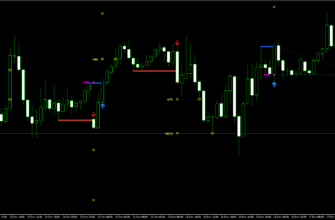
The GT Scalper Indicator uses a combination of advanced algorithms and visual tools to analyze market trends and generate signals. It identifies buy and sell opportunities based on color-coded signals:
- Blue signals indicate a buy opportunity
- White signals indicate a sell opportunity
- Black indicates market consolidation, advising traders to wait
The system uses three main components to confirm signals:
- Entry/Exit Arrows: Show potential trade points
- Histo + XS Indicators: Confirm entry signals
- GT Matrix: Provides additional trend confirmation
Strategies
The GT Scalper offers three trading templates based on different risk levels:
- Normal Mode: Balanced signals with limited risk, ideal for both beginners and experienced traders
- Fast Mode: Aggressive trading with quicker signals and highest profit potential, suitable for scalpers
- Swing Mode: Conservative signals designed for higher timeframes, perfect if you prefer less frequent but more strategic trades
You can choose between a simple mode (focusing on basic signal confirmation) or an advanced mode (including GT Matrix analysis for enhanced accuracy).

Key Features
- Timeframes: Compatible with 15-minute to 1-hour charts
- Customizable Risk Levels: Includes three templates for different trading styles
- Available Pairs: Any forex pair, with a focus on major pairs
- Versatility: Works with various trading styles and assets
Key Advantages for Traders
- Ease of Use: Simple color-coded signals make it accessible for traders of all levels
- Non-Repainting Indicator: Guarantees stable signals without misleading shifts
- Signal Alerts: Provides alerts via mobile notifications or platform pop-ups
- Comprehensive Analysis: Combines multiple confirmation methods for additional precision
- Enhanced Profitability: Helps identify trending markets and avoid flat periods

How to install The GT Scalper Indicator
- Download the GT Scalper Indicator file using this link or the download button above.
- Open your MetaTrader 4 application, click File – Open Data Folder.
- Open the “MQL4” folder within the MT4 directory.
- Find the “Indicators” subfolder and open it.
- Copy the downloaded GT Scalper Indicator files into the “Indicators” folder.
- Find the “Templates” subfolder and open it.
- Copy the downloaded GT Scalper Indicator files into the “Templates” folder.
- In MT4, navigate to the “Navigator” window on the left side of the interface.
- Right click anywhere inside the “Navigator” window and click “Refresh”.
- Expand the “Indicators” section.
- Find the GT Scalper Indicator in the list, then drag and drop it onto your desired chart.
- Adjust the settings in the indicator’s properties window if desired (the default settings are optimized for immediate use).
- Click “OK” to apply the Indicator to your chart.
Conclusion
The GT Scalper Indicator for MT4 is a reliable and user-friendly tool designed to enhance trading efficiency and accuracy. With its non-repainting technology, customizable templates, and versatile features, it caters to a broad spectrum of trading needs. Whether you’re new to trading or an experienced scalper, the GT Scalper Indicator can help you navigate the wild Forex market with greater confidence.